
Do you love to organise yourself or your business by writing checklists on bits of paper or in word or excel? Have you ever thought about using Checklist software instead?
Checklist software offers huge benefits to businesses as a guide to best practices that can guide team members through a whole process completing it the best possible way every time.
What is software checklist?
What is checklist software? First, ask what is a checklist?
A checklist is a way to document each step needed to complete a task. A detailed set of instructions, a guide of how something is done.
Checklist software allows you to document every step of a process to be used over and over again.
Checklists are a proven way to organise and manage tasks, resulting in reduced errors, maintained consistency, increased efficiency, productivity, and ensuring every step in a task in a process is completed.
Do you need a checklist or to do list? How do to do lists and checklists differ? Think of a To-do list ‘what to do’ and a checklist ‘how to do’ it.
Why Use A Checklist?
Try to remember everything is mentally exhausting. The problem with our minds we can easily find ourselves forgetting something. Giving someone a checklist for a task increases the chances of completing it, spurs people to get stuff done, encourages collaboration, inspires delegation and prevent errors caused by skipping basic steps.
It’s easy to miss or forget a step in a process when tasks require so many steps! Using checklists can stop these mistakes.
We might be a little bias but checklists are amazing and don’t just believe us but look at the amazing results they can offer. They first started with the B17 bomber and the first pre flight checklist, followed by NASA checklist which helped astronauts get to land on the moon.
A checklist offers a way to set out clear steps in how something should be completed.
How do I create an online checklist?
There are many ways you can create online checklists.
You need to decide what you want from your checklist. Do you want to create a checklist to print off and hand out, do you want it online for everyone to use or do you want interactive.
here are some ideas for creating checklists online.
- Microsoft
- Checklist Software
- Checklist App
Google Checklists
Google – Google offer a number of ways to create a checklist.
Google Tasks is a Chrome extension. Integrations with Gmail and Google Calendar.
Google Keep – Slightly more a to-do list than a checklist which is shareable. Make a list to remember to pick up some shopping? Watch as items get completed in real-time.
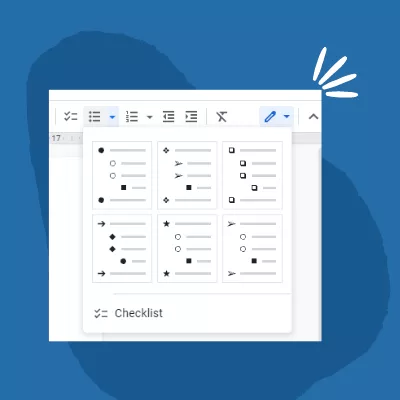
Google Docs – Create a checklist in google docs.
How to create a check box in google docs.
- Create you list and select all items you want included
- Click the down the “Bulleted list” icon then select the checkbox.
- This places a checkbox at the start of each item in the list
Microsoft Checklists
Microsoft has a number of ways to create Checklists.
Microsoft To Do – To Do List app that can be used on both desktop computers and mobile phone checklist apps.
Word – Creating Word check box in Microsoft Word. This is quite a simple way to create a check box on a word like in google above
Checklist Software
Here are some Checklist Software products available currently.
Checkify – Simple and easy way to manage checklists, tasks and processes in one place.
Asana – To-do list app for work
Clickup – Manage your projects all in one place
Manifestly – Recurring Checklists
Process.st – Recurring Business Processes
checkli – Recurring checklist or process
Is there an app for a daily checklist?
There are a number of daily checklist app available and all offer different benefits depending on how you want to use them.
For instance, do you just want a personal one-off checklist or to-do list? What is the difference between a todo list and a checklist?
Checklist Apps
Todoist – Collaborate on task
Evernote – Notes, and tasks in one place.
TickTick – Manage all your to-dos
Checklist Software Features
What features to look for in a great Checklist Software that could help your business grow. Here are some checklist software features and the benefits:
- Create Templates or Blueprints: Checklist template (a list of steps in a process) some would refer to this as an best practices, standard operating procedure (SOP).
- Recurring Checklist:
Launchable recurring checklist so you only ever have to type details in once.
Schedule checklists: Schedule to run at a specific time for example: daily, weekly, monthly or after a certain action has been performed. - Assign Tasks & Checklists: Assign to the best person to perform that task. Every task within a checklist could be assigned to a different person for them to perform their roll within the process.
- Integrate and API: Create tasks and assigned automatically based on triggered events in other workspaces through either a zapier integration or a API. Connect directly with systems like salesforce, social media, slack etc
- Track Tasks and Checklists: Track status of checklists, automatically send notifications of new assignments, notify overdue tasks, and mentions.
- Collaboration: Add comments and mentions with a process or task between colleagues. Giving greater accountability and traceability of tasks.
- Analysis: Reporting and data analysis to allow for continuous improvement of your checklists and processes.
- One Off Tasks: Allow for one off tasks not part of a checklist. Like a to do list item as not everything in the work day that needs doing is within a checklist.
Checklist Software – Checkify
Here at Checkify we love checklists and that is why Checkify was born from the love of organising our business using the power of checklists and we want to share that with you.
Understand the power a checklist can offer your business. Helping stop mistakes and reduce human error but also the consistency of results.
Checkify checklist software allows you to manage business processes and workflow. Creating a to do list of tasks for every step of a checklist that needs to be completed.
Manage workflow and track tasks to know who’s doing what, and where they are in the process. Our automation bots give checklists superpowers to make tasks happen without anyone touching a single button
Checklists are habit forming so start getting more stuff done with a checklist today.